Written by: VPNonix Editorial Team
Technical Review: VPNonix Research Team
Last Updated: February 2026
No-Logs Policy – Bottom Line
- A no-logs policy means a VPN claims it does not store your browsing activity or identifiable connection data.
- Not all “no-logs” claims are equal — some providers still collect limited metadata.
- The key difference is whether stored data can be linked back to you.
- Independent audits (Cure53, PwC, Deloitte) add credibility.
- Strong encryption alone is not enough — privacy depends on both infrastructure and logging practices.
In short: A real no-logs VPN minimizes stored data so there is little or nothing to hand over if requested.
What Is a No-Logs Policy?
A no-logs policy is a claim made by a VPN provider stating that it does not collect, store, or monitor users’ online activity.
In practical terms, this means the VPN should not record:
- Websites you visit
- Apps you use
- Files you download
- Your real IP address
- Connection timestamps linked to your identity
However, not all “no-logs” claims are equal. The details depend on what type of data is being discussed.
Understanding VPN Logging
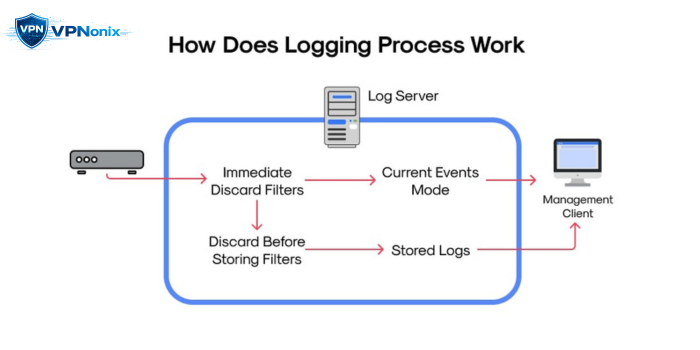
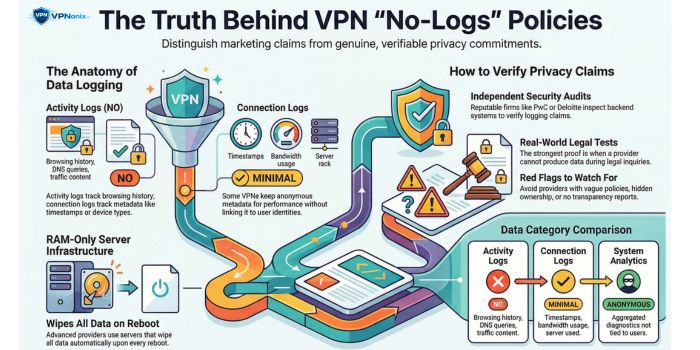
VPN data collection generally falls into three categories:
1. Activity Logs
These include browsing history, DNS queries, and traffic content.
A legitimate no-logs VPN should not store this.
2. Connection Logs
These may include:
- Connection timestamps
- Bandwidth usage
- Server used
- Device type
Some providers collect minimal connection metadata for operational purposes.
3. Aggregated or Anonymous Analytics
Certain VPNs collect system diagnostics without linking them to identifiable users.
The distinction between these categories is critical.
Why No-Logs Policies Matter
A VPN routes all your internet traffic through its servers.
If the provider logs user activity, it technically has visibility into your browsing patterns.
Without a strict no-logs policy:
- Data may be shared with third parties
- Logs may be requested by authorities
- User privacy can be compromised
A real no-logs policy reduces the amount of data that even exists to be requested.
Can a VPN Truly Keep “Zero Logs”?
Technically, some minimal operational data may still be required to:
- Maintain server performance
- Prevent abuse
- Enforce service limits
The key question is whether this data can identify you.
A privacy-focused VPN designs its infrastructure so that:
- Logs are not stored long term
- Identifiers are not tied to individuals
- Servers operate on RAM-only systems (data wiped on reboot)
Independent Audits and Verification
Because users cannot directly inspect a VPN’s backend systems, verification matters.
Reputable VPN providers often commission audits from firms such as:
- Cure53
- PwC
- Deloitte
These audits assess:
- Logging practices
- Infrastructure design
- Privacy compliance
While an audit is not a permanent guarantee, it increases transparency.
Real-World “No-Logs” Tests
In some cases, VPN providers have undergone legal scrutiny where authorities requested user data.
When a provider truly maintains no logs, it cannot produce activity records — because none exist.
Such incidents have become important real-world proof points for evaluating privacy claims.
How No-Logs Connects to VPN Protocols
Logging policies are separate from encryption methods, but both impact privacy.
Modern protocols like WireGuard and OpenVPN influence how traffic is secured.
If you are unfamiliar with how these protocols function, see our full breakdown of
VPN protocols explained
Strong encryption without a no-logs policy still leaves privacy gaps.
Red Flags in “No-Logs” Claims
Be cautious if:
- The privacy policy is vague or overly broad
- The provider is registered in opaque jurisdictions
- There is no transparency report
- There are no third-party audits
- The company ownership is unclear
Marketing language is not the same as legal commitment.
What to Look for in a Trustworthy No-Logs VPN
- Clear definition of what is not logged
- Independent security audit
- RAM-only servers
- Transparent company structure
- Minimal data retention language
Always read the privacy policy carefully before subscribing.
Final Assessment
A no-logs policy is not simply a marketing term.
It is a structural privacy commitment.
However, verification, transparency, and infrastructure design determine whether the claim holds weight.
Before choosing a VPN, evaluate the policy, audit history, and technical architecture — not just the headline.
Frequently Asked Questions
What does “no-logs” actually mean?
It means the VPN provider claims it does not store records of your browsing activity or identifiable connection data.
Can police obtain data from a no-logs VPN?
If the provider genuinely keeps no identifiable logs, there may be no activity data available to provide.
Do all VPNs keep some logs?
Many VPNs keep minimal operational logs. The key issue is whether that data can be tied to your identity.
Is a no-logs VPN completely anonymous?
Not automatically. Payment methods, device fingerprints, and account details can still create traceability if not handled carefully.
Are free VPNs likely to have real no-logs policies?
Free VPNs often rely on alternative monetization models. Always review their privacy documentation and transparency record before trusting a no-logs claim.
References (With Direct Links)
1) Cure53 – Independent Security Audits
Many VPN providers use Cure53 for infrastructure and no-logs verification audits.
2) PwC – VPN Audit Example (NordVPN No-Logs Verification)
PwC has conducted independent no-logs audits for VPN providers.
https://nordvpn.com/blog/nordvpn-no-logs-audit-2023
3) Deloitte – ExpressVPN No-Logs Audit
Deloitte performed independent verification of ExpressVPN’s no-logs claims.
https://www.expressvpn.com/blog/expressvpn-no-logs-audit
4) Real-World No-Logs Case (ExpressVPN – Turkey Investigation)
An example frequently cited in discussions about no-logs enforcement.
https://www.bbc.com/news/world-europe-41834878
5) Proton VPN Transparency & Audit Page
Example of a provider publishing audit reports and transparency details.
https://protonvpn.com/blog/no-logs-audit
6) CSIRO / ICSI / UC Berkeley Study (VPN Privacy Risks Research)
Academic research frequently referenced in VPN privacy discussions.
https://research.csiro.au/isp/wp-content/uploads/sites/106/2016/08/paper-1.pdf
Author & Review Information
VPNonix Research Team
The VPNonix editorial team specializes in VPN analysis, encryption research, and digital privacy tools. All guides follow structured testing methodology and technical verification before publication.