Written by: VPNonix Editorial Team
Technical Review: VPNonix Research Team
Last Updated: February 2026
What Is a VPN – Bottom Line
- A VPN encrypts your internet traffic and hides your real IP address.
- It creates a secure tunnel between your device and the internet.
- Your ISP can see that you’re connected to a VPN — but cannot see what you’re doing online.
- VPNs improve privacy on public Wi-Fi and help bypass geo-restrictions.
- A VPN enhances security, but it does not make you fully anonymous or replace antivirus software.
In short – What Is a VPN: A VPN is a privacy tool that protects your connection — not a magic invisibility cloak.
How a VPN Protects Your Internet Connection
A VPN (Virtual Private Network) is a cybersecurity tool that encrypts your internet connection and routes your traffic through a secure server, hiding your real IP address and protecting your data from tracking, surveillance, and interception.
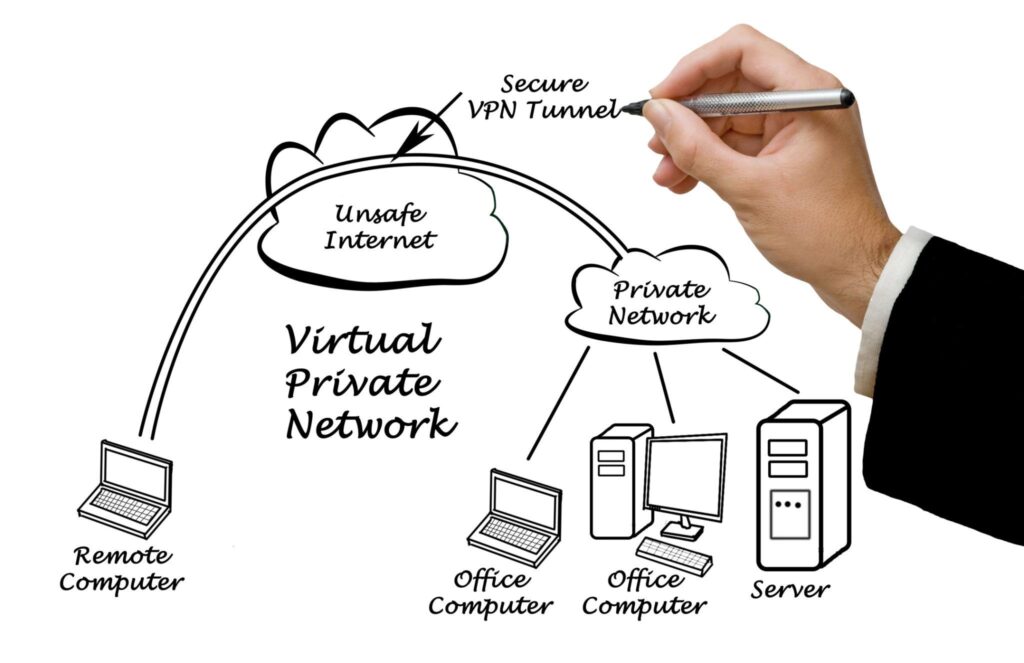
In simple terms, a VPN creates a secure, encrypted tunnel between your device and the internet.
This next “What Is a VPN” guide will explain:
- What a VPN actually does
- How VPN encryption works
- When you should use one
- Whether VPNs are safe
- What limitations you should understand
What Is a VPN? (VPN Meaning Explained)
A VPN, or Virtual Private Network, is software that enhances online privacy and security by:
- Encrypting your internet traffic
- Masking your public IP address
- Securing data on public Wi-Fi
- Allowing access to geo-restricted content
Instead of connecting directly to a website, your traffic first travels to a VPN server, which then forwards the request on your behalf.
This process prevents third parties — such as internet service providers (ISPs), advertisers, or network administrators — from reading your browsing data.
How Does a VPN Work?
A VPN operates using three core technologies:
1. Encryption
Before data leaves your device, it is encrypted.
Most modern VPNs use:
- AES-256 encryption
- Perfect Forward Secrecy
- Secure key exchange mechanisms
Encryption converts readable data into unreadable code. Even if intercepted, it cannot be understood without the decryption key.
2. IP Address Masking
Every internet connection has a public IP address that reveals:
- Approximate location
- Internet provider
- Network identity
When connected to a VPN:
- Your real IP is hidden
- The VPN server’s IP appears instead
- Your virtual location changes
This is how VPNs enable streaming access and prevent direct IP-based tracking.
3. Secure Tunneling Protocols
Protocols determine how the encrypted tunnel is created.
Common VPN protocols include:
- WireGuard (modern, fast, lightweight)
- OpenVPN (open-source, highly secure)
- IKEv2/IPSec (stable for mobile connections)
Each protocol balances speed, security, and reliability differently.
If you want deeper technical detail, see our guide on VPN protocols explained.
(Internal link: /guides/vpn-protocols-explained)
What Happens When You Turn On a VPN?
- You select a server location.
- Your device establishes an encrypted connection.
- Data is encrypted locally.
- Traffic travels securely to the VPN server.
- The VPN server forwards your request to the website.
- The response is encrypted and returned to you.
Your ISP can see that you are connected to a VPN, but cannot see what websites you visit or what data you transmit.
Real-World Example: Public Wi-Fi Without a VPN
Imagine connecting to free airport Wi-Fi.
Without a VPN:
- Traffic may be intercepted.
- Login credentials could be exposed.
- Your IP address is visible.
With a VPN:
- Traffic is encrypted.
- Data cannot be read if intercepted.
- Your real IP remains hidden.
This is why VPNs are strongly recommended on unsecured networks.
VPN vs No VPN (Quick Comparison)
| Without VPN | With VPN |
|---|---|
| ISP can monitor traffic | ISP sees encrypted data only |
| Real IP address visible | Masked IP address |
| Location fixed | Location changeable |
| Vulnerable on public Wi-Fi | Encrypted connection |
When Should You Use a VPN?
A VPN is recommended when:
- Using public Wi-Fi networks
- Protecting online privacy
- Avoiding ISP throttling
- Accessing region-restricted services
- Traveling to restrictive countries
For many users, a VPN is a continuous privacy layer rather than an occasional tool.
If you’re choosing a provider, see our best VPNs tested in 2026.
(Internal link: /reviews/best-vpn-2026)
What a VPN Does NOT Do
For clarity and accuracy for understanding What Is a VPN:
A VPN does not:
- Make you completely anonymous
- Prevent malware infections
- Block phishing attacks
- Remove tracking cookies
- Replace antivirus software
A VPN improves privacy. It does not eliminate all online risks.
Are VPNs Safe?
VPNs are generally safe when:
- They use strong encryption
- They maintain a verified no-logs policy
- They undergo independent audits
- They operate under privacy-friendly jurisdictions
Free VPNs, however, may:
- Log user data
- Inject advertisements
- Sell browsing information
See our full analysis:
(Internal link: /guides/are-free-vpns-safe)
Are VPNs Legal?
VPN use is legal in most countries.
However, some jurisdictions restrict or regulate VPN usage. Users should always verify local regulations before connecting in regulated regions.
Does a VPN Slow Down Internet Speed?
Yes — slightly.
Because:
- Traffic is encrypted
- Data is rerouted through another server
With modern protocols like WireGuard, speed reduction is typically 5–20%, depending on server distance and infrastructure quality.
Frequently Asked Questions
What Is a VPN?
A VPN encrypts your internet traffic and routes it through a secure remote server, hiding your real IP address and protecting your online activity from ISP tracking, network monitoring, and interception. In simple terms, a VPN improves privacy by masking your identity and securing your connection.
Is a VPN safe to use?
A VPN is safe when it uses strong encryption standards like AES-256 and follows a verified no-logs policy. Reputable VPN providers undergo independent security audits to confirm that user data is not stored or sold.
How does VPN encryption work?
VPN encryption converts readable data into unreadable code before it leaves your device. Using secure protocols such as WireGuard or OpenVPN, the VPN creates an encrypted tunnel that protects data from interception on public Wi-Fi or unsecured networks.
Does a VPN stop ISP tracking?
Yes. A VPN prevents your internet service provider (ISP) from seeing which websites you visit or what data you transmit. While your ISP can detect that you are connected to a VPN, it cannot read your encrypted browsing activity.
Can a VPN change my location?
A VPN changes your visible IP address by assigning you the IP of the selected server location. This makes it appear as if you are browsing from another country, which is commonly used to access geo-restricted streaming services.
Do I need a VPN for streaming?
Many users use a VPN for streaming to access content libraries available in other regions. However, some streaming platforms attempt to block VPN servers, so performance depends on the provider’s server network and technology.
Should I keep my VPN on all the time?
Keeping your VPN enabled at all times provides continuous encryption and privacy protection, especially on public networks. Some users disable it for local services or when maximum speed is required, but constant use offers stronger privacy coverage.
Editorial Standards
All technical explanations in this “What Is a VPN “guide are based on publicly available encryption standards, protocol documentation, and recognized cybersecurity authorities. Information is reviewed periodically to reflect updates in VPN technologies and security practices.
Sources & References
- National Institute of Standards and Technology (NIST) — FIPS 197: Advanced Encryption Standard (AES)
https://nvlpubs.nist.gov/nistpubs/FIPS/NIST.FIPS.197.pdf - Internet Engineering Task Force (IETF) — RFC 4301: Security Architecture for IP (IPsec)
https://datatracker.ietf.org/doc/html/rfc4301 - Internet Engineering Task Force (IETF) — RFC 8446: The Transport Layer Security (TLS) Protocol Version 1.3
https://datatracker.ietf.org/doc/html/rfc8446 - WireGuard Official Documentation
https://www.wireguard.com/ - OpenVPN Official Documentation
https://openvpn.net/community-resources/ - Cybersecurity and Infrastructure Security Agency (CISA) — Using Public Wi-Fi Networks Safely
https://www.cisa.gov/resources-tools/resources/using-public-wi-fi-networks-safely - European Union Agency for Cybersecurity (ENISA) — Publications Library
https://www.enisa.europa.eu/publications - Electronic Frontier Foundation (EFF) — Surveillance Self-Defense Guide
https://ssd.eff.org/
Author & Review Information
VPNonix Research Team
The VPNonix editorial team specializes in VPN analysis, encryption research, and digital privacy tools. All guides follow structured testing methodology and technical verification before publication.